Spilled liquid on your laptop: what to do
Liquid spills are one of the most common reasons laptops end up in a repair shop. What causes the real damage is not the liquid alone but liquid combined with electricity, so act quickly.

What to do right away
- Turn the laptop off immediately and unplug the charger.
- Disconnect the battery, if your model allows it.
- Turn the laptop upside down so the liquid does not flow deeper. Be careful not to let it run onto the screen.
- Soak up the liquid with a dry cloth or plenty of paper towels.
- Do not switch the laptop on to check if it works. This is how most short circuits happen.
- Bring it to a repair service for cleaning and diagnosis as soon as possible.
The most common mistake
Many people wipe the outside dry but leave the inside wet. We have found liquid inside a laptop several weeks after a spill. It can reach any part of the board, including the memory slots.
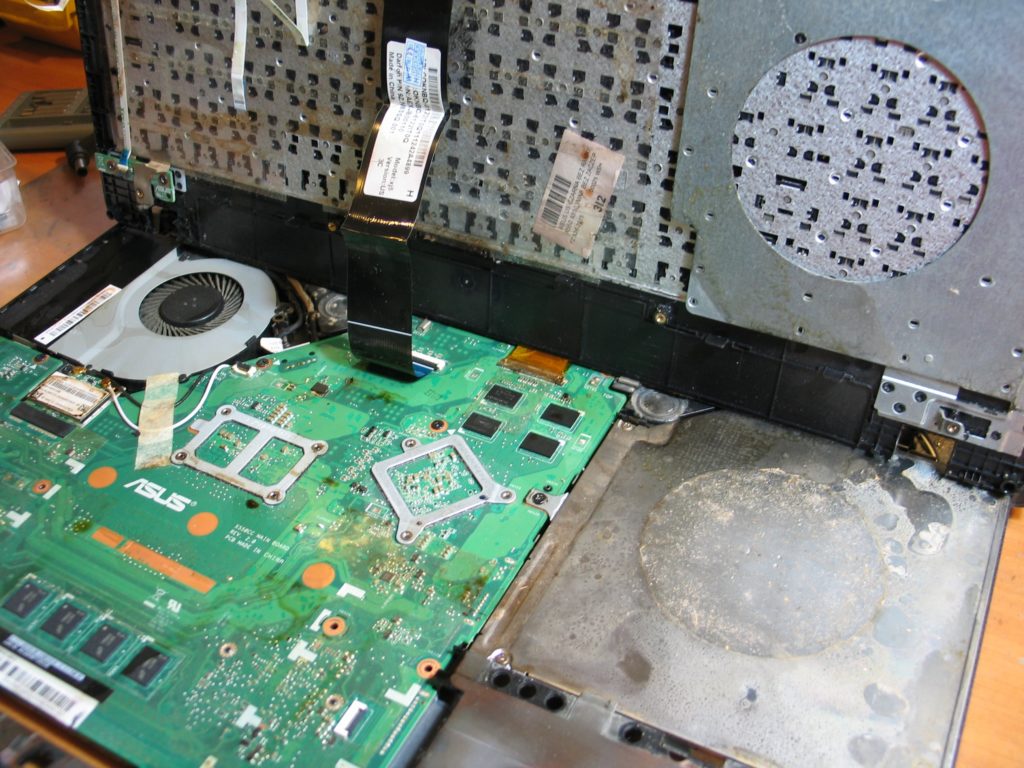
Can a liquid-damaged laptop be saved?
In most cases we have seen, yes. Sometimes the keyboard has to be replaced. The repair takes patience, because liquid damages random components, so it can take from a few days to a few weeks. If the laptop cannot be repaired, you get it back with no extra charge. If you have important files on it, see data recovery.
Every repair comes with a 3-month warranty, and every new part with a 2-year warranty.
Spilled something? Call us
Call 729 40 50 45 or see how to find us.